 PocketBull
Your First Real Investment
with PocketBull
A complete walkthrough from running your first cycle to placing real orders in Fidelity — built from a real first-time investor's experience on 12 May 2026.
👶 Never invested before? Start with Investing Basics in our FAQ — it explains what a stock is, what an ETF is, what a brokerage account is, and whether you can lose money. Come back here once you have those foundations.
📖 Know the basics, unfamiliar with brokerage screens? Words like ETF, ticker symbol, fractional shares, and fill price are explained in the Key Terms Glossary (Section 11) at the bottom of this guide — read it first, then come back to Section 1.
A Quick Reference Checklist (Section 12) is at the end — print it for your first live session.
PocketBull's Role — and Yours
PocketBull reads live market data, scores four investment buckets, and tells you how much to invest this cycle and how to split it. That is all it does.
Think of PocketBull like a well-researched friend who says: "Market looks bearish today — good entry opportunity. I'd put $200 in, split 35% safety / 33% growth / 18% steady / 15% wildcard." Then you go to your broker and place the actual orders.
Understanding PocketBull's 4 Investment Buckets
Every PocketBull cycle splits your investment across four buckets, each representing a different strategy. The AI scores each bucket and adjusts the split based on today's market mood.
| Bucket | Strategy | ETF Used in This Guide | Amount This Cycle |
|---|---|---|---|
| Safety AnchorBroad market, most stable layer | S&P 500 index — 500 large US companies in one ETF | SPY | $70 · 35% |
| Growth EngineTech and innovation focus | Nasdaq-100 — top 100 tech & growth companies | QQQ | $65 · 33% |
| Steady IncomeDividend-paying ETFs | Dividend-growth ETF — companies with growing payouts | SCHD | $35 · 18% |
| WildcardSmall-cap / emerging markets | S&P SmallCap 600 — smaller US companies with high growth potential | IJR | $30 · 15% |
Step 1 — Getting to the Right Place on Fidelity
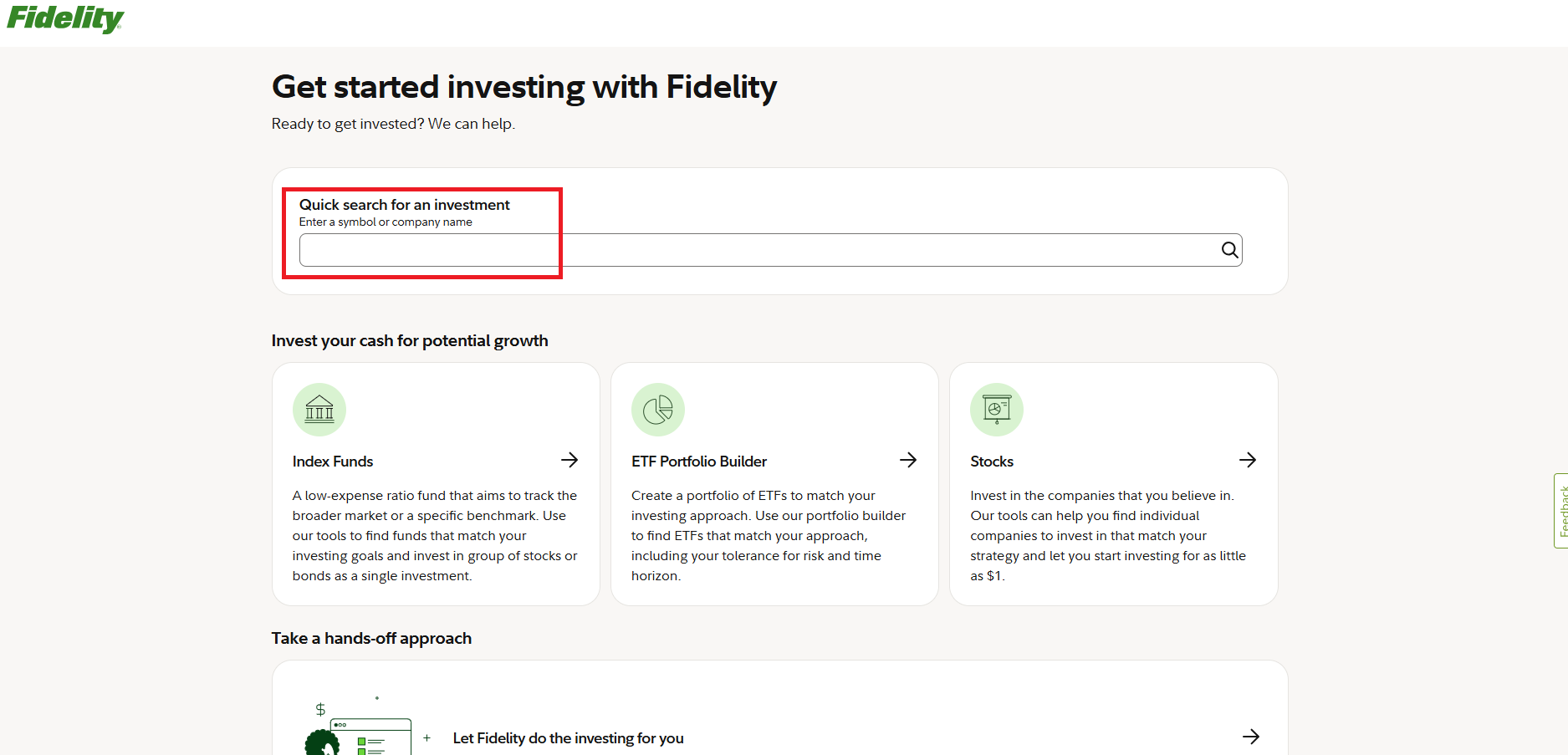
Log in to Fidelity. From the home screen, use the "Quick search for an investment" box to type the ETF symbol. You can also navigate via Accounts & Trade → Trade.
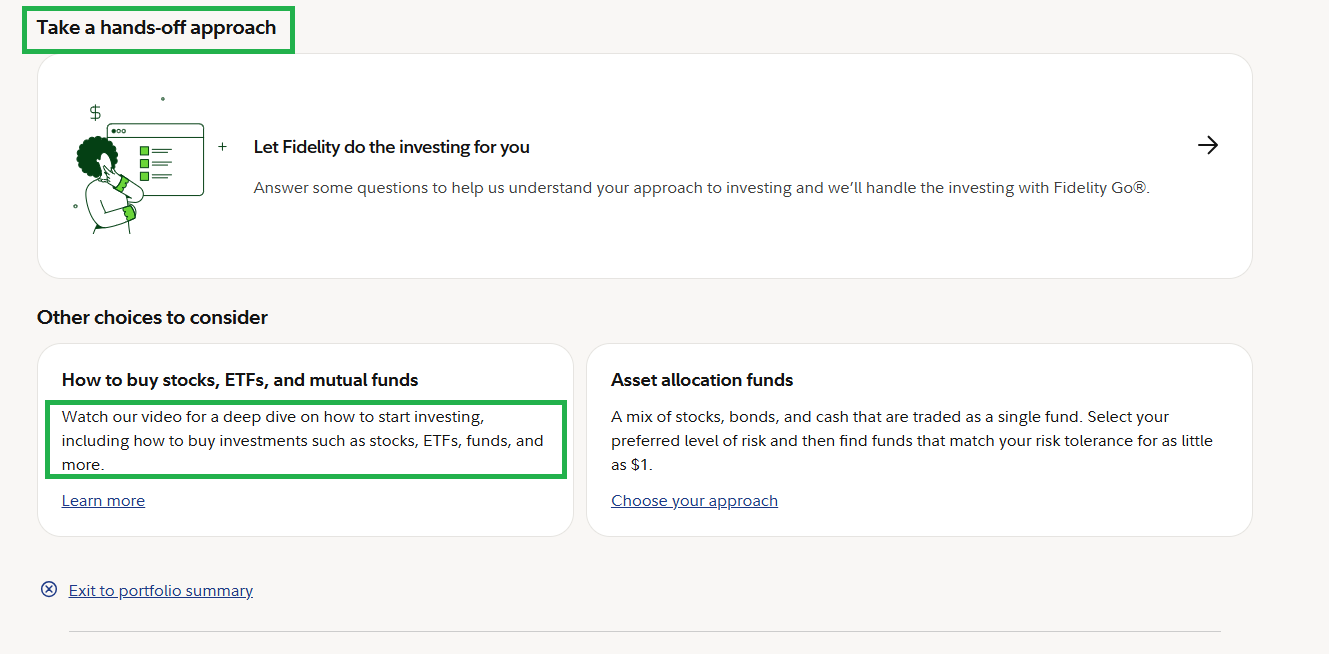
You can also see Fidelity offers a "hands-off" approach (Fidelity Go, automatic investing). We are not using that. We are doing informed, PocketBull-guided investing — see Section 10 for why.
Step 2 — What to Look at on the Research Page
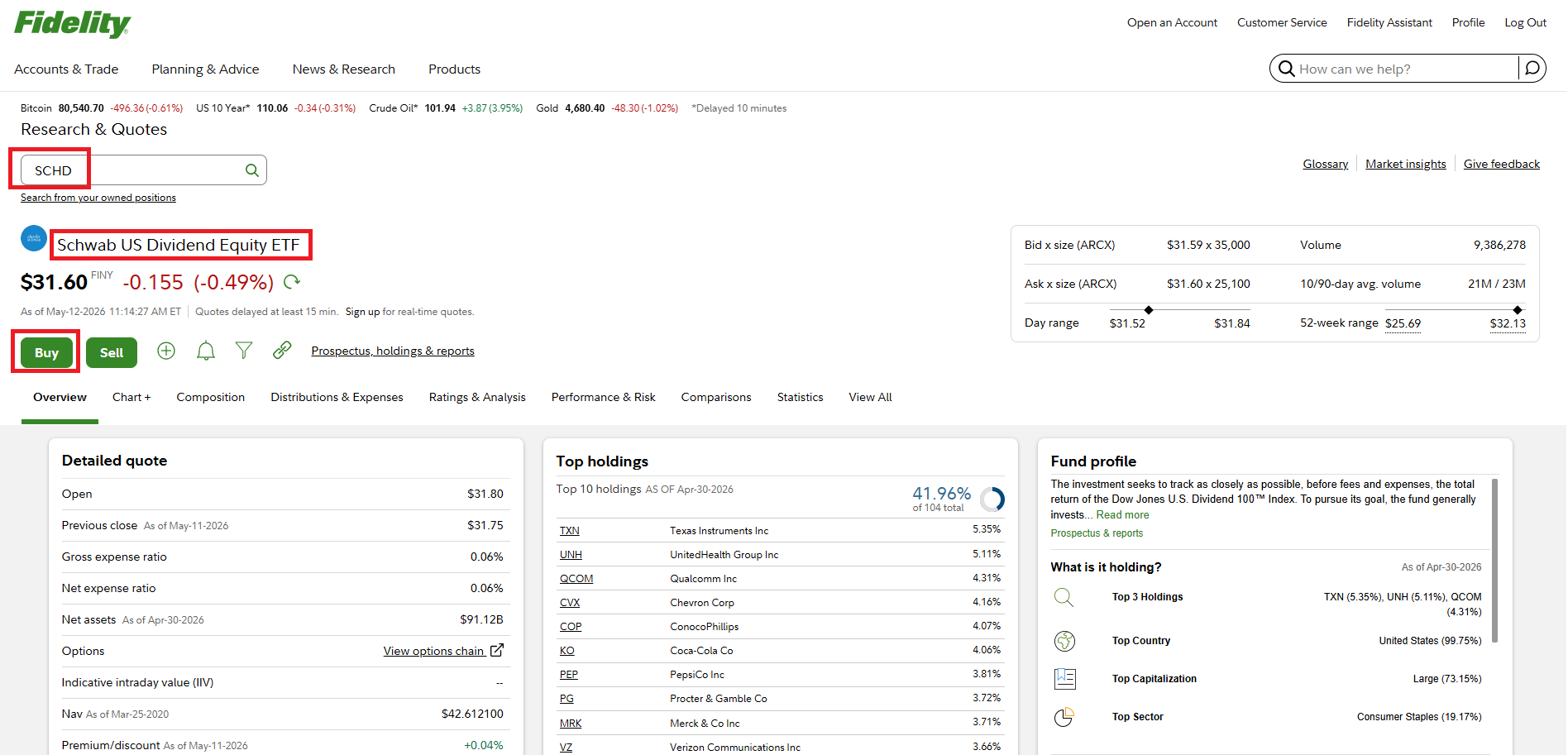
When you search for SPY, Fidelity shows the Research & Quotes page. You don't need to understand everything here — but a few things are worth knowing.
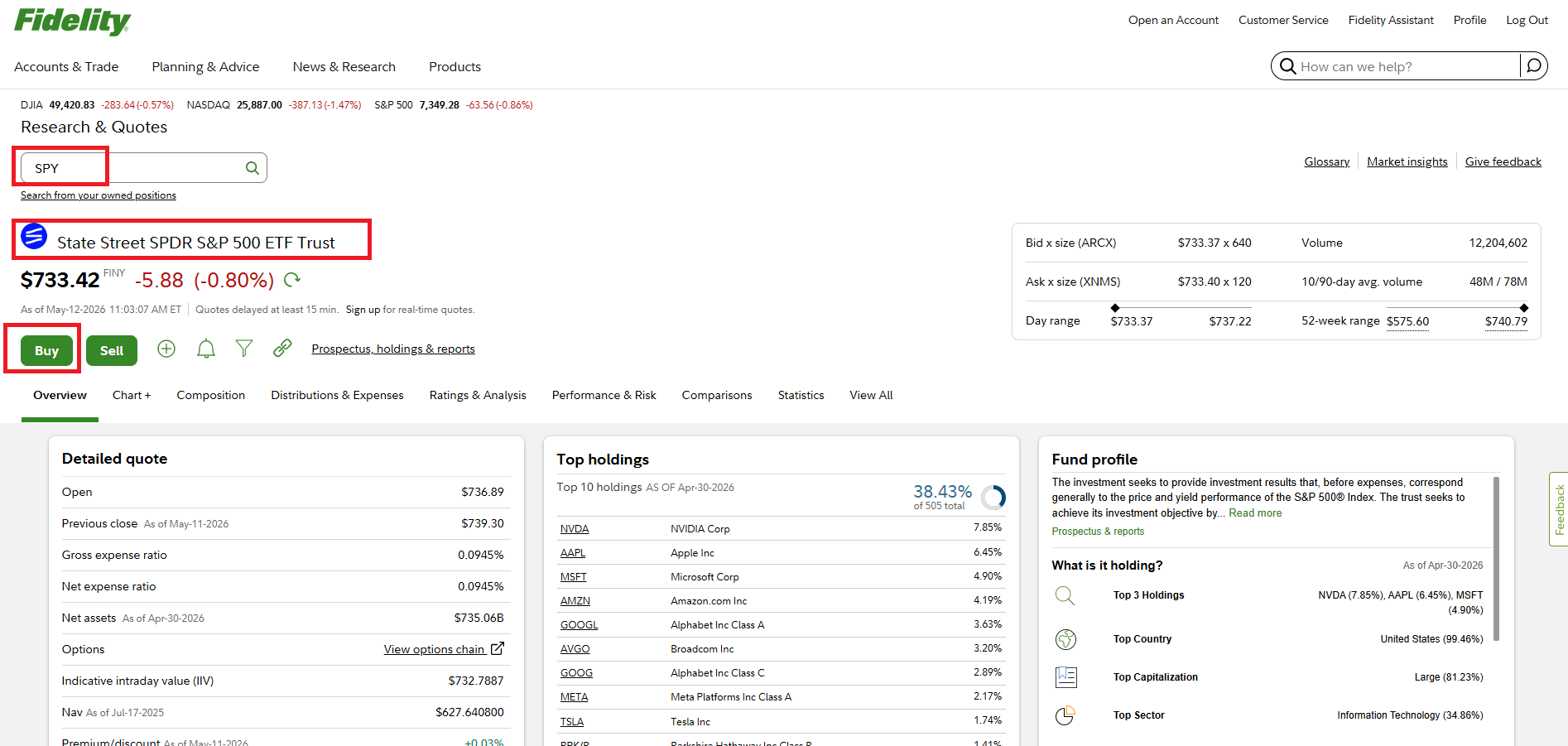
Always verify the full name matches what you intended. SPY = "State Street SPDR S&P 500 ETF Trust". If something looks wrong, go back and search again.
Red (-0.80%) means the price is down today. For a long-term SIP investor, a dip is a good thing — you're buying at a lower price. PocketBull's scoring system rewards dips with higher entry scores.
The Buy button opens the order panel. You don't need to read the entire research page to place an order.
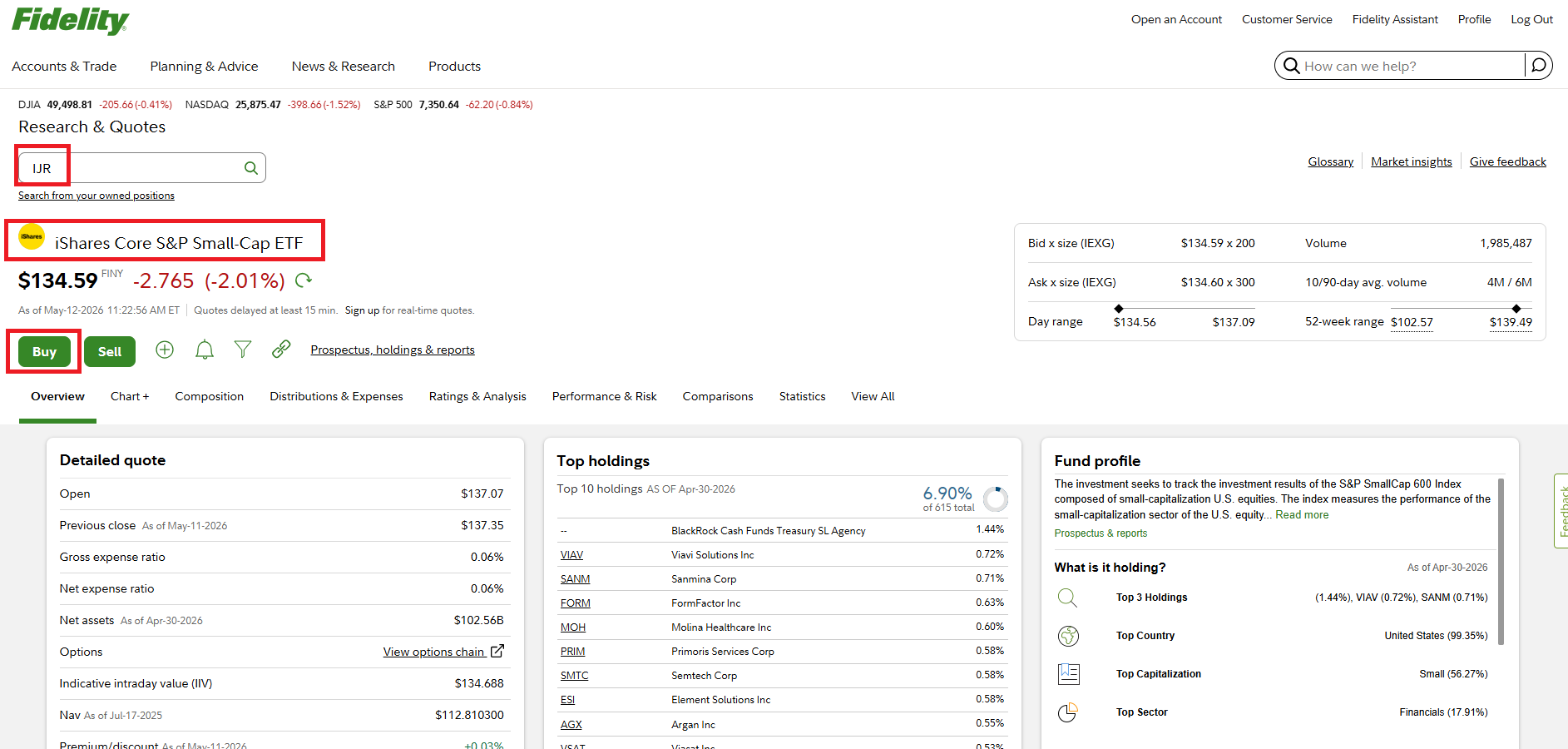
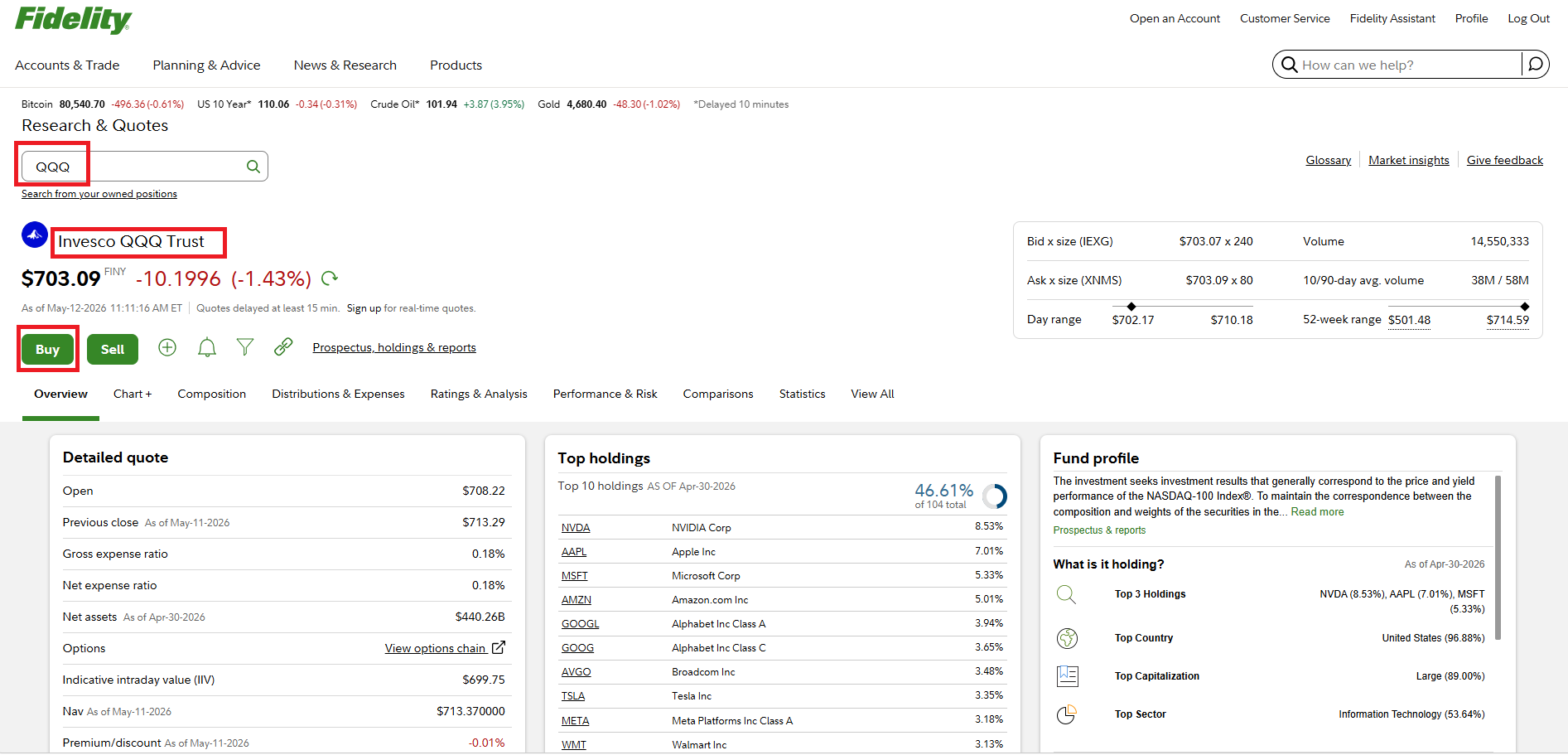
You'll see similar pages for all 4 ETFs
Step 3 — Placing Your First Order (SPY — Safety Anchor)
After clicking Buy on the SPY research page, a Trade panel opens on the right side. Here is exactly how to fill it in.
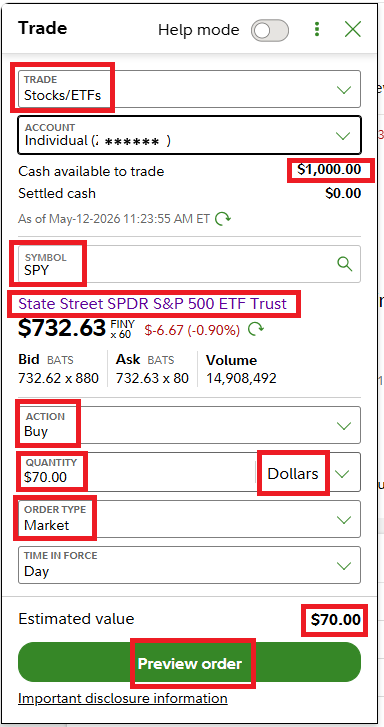
Make sure you're in the Stocks/ETFs tab, not Options or Mutual Funds.
Select the account where you want to invest. "Cash available to trade: $1,000" confirms you have funds.
Fidelity shows the full name and live price as confirmation.
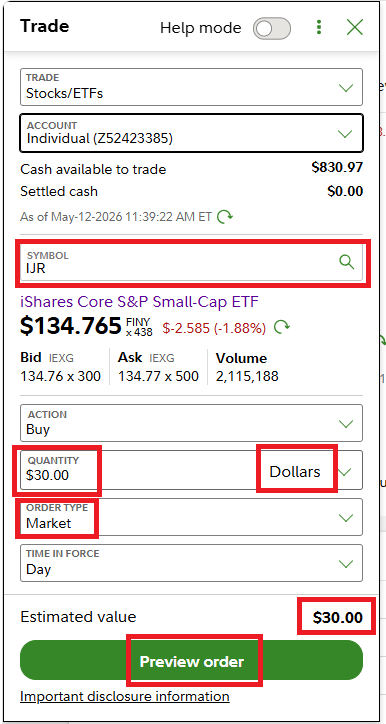
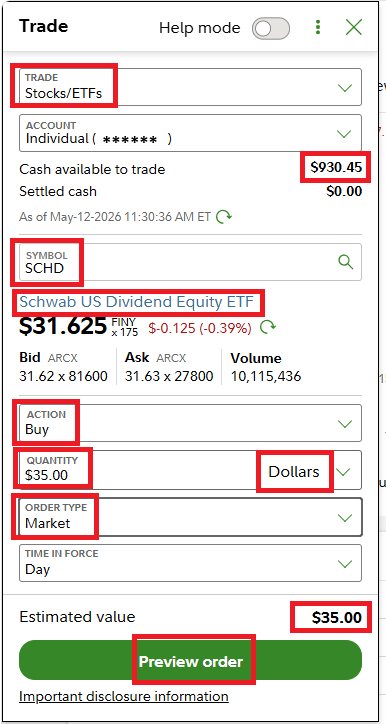
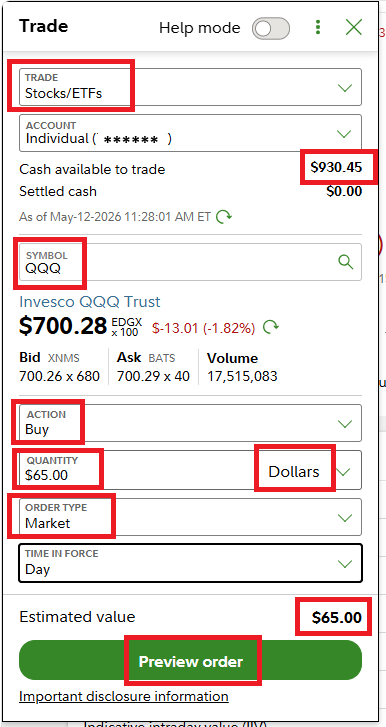
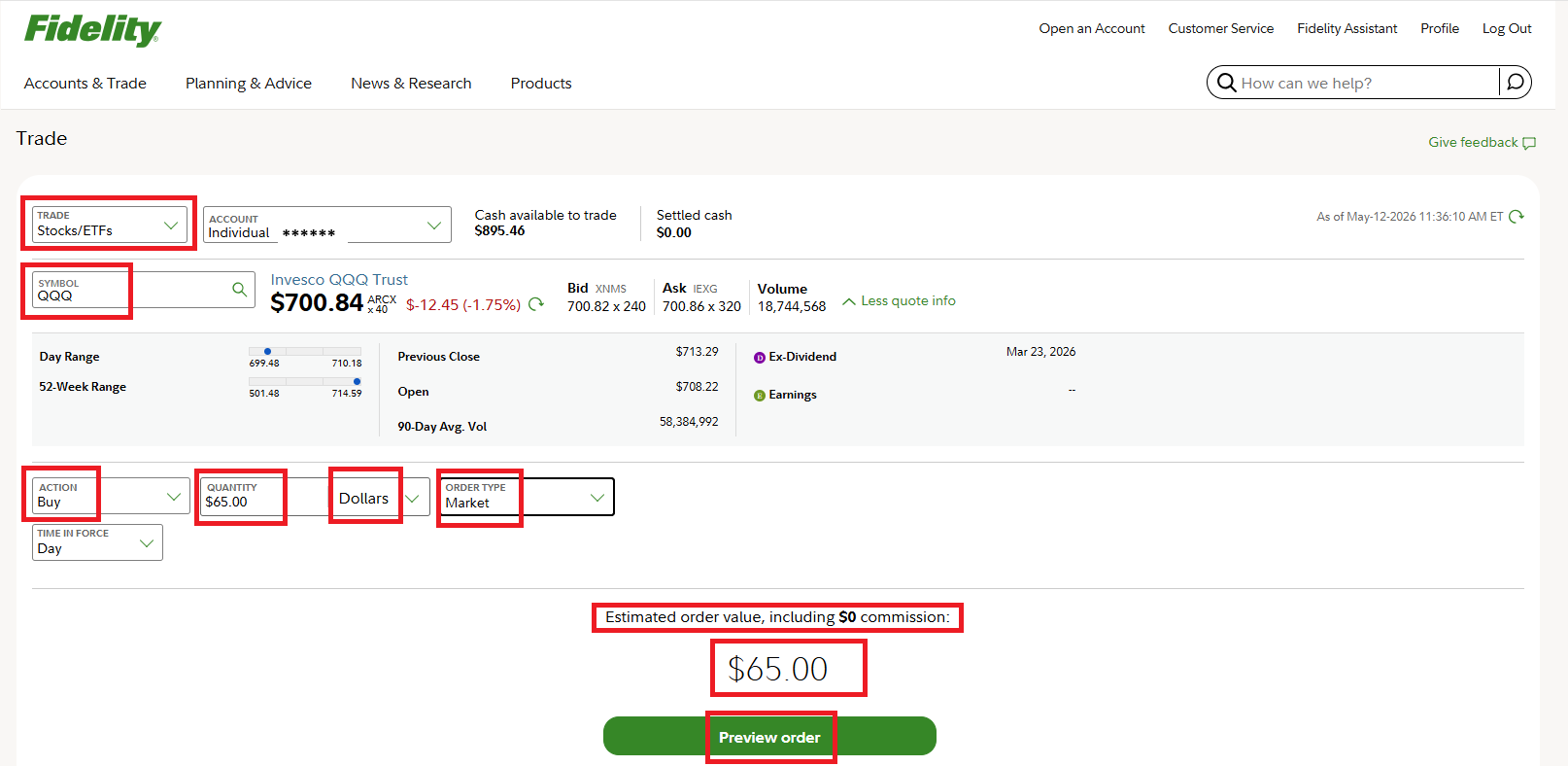
This is the key step. Change the quantity type from "Shares" to Dollars. Then type the dollar amount PocketBull suggested. You do not need to calculate shares.
Executes immediately at the current best available price. Correct for ETFs during trading hours.
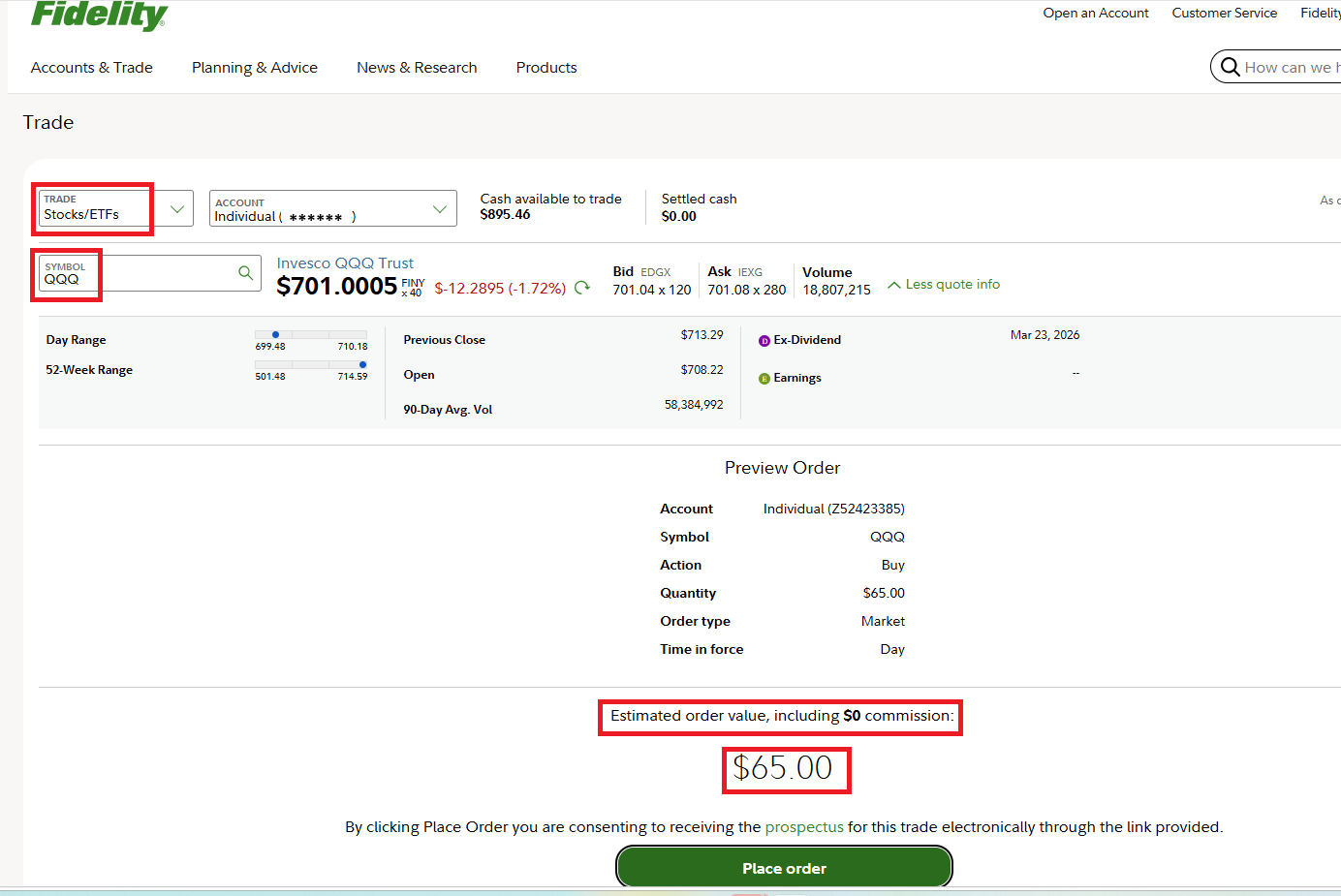
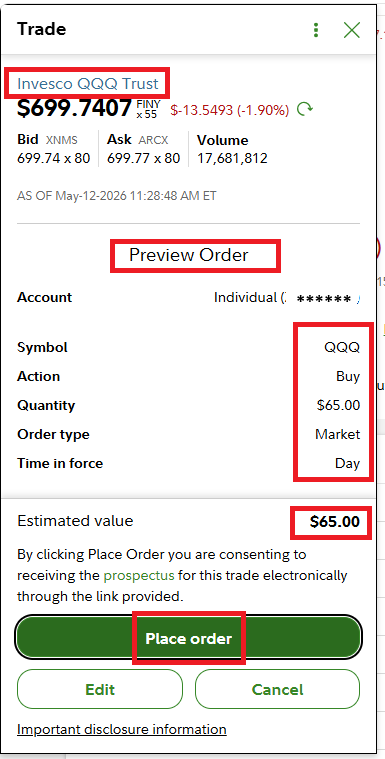
Fidelity shows a summary before confirming. Review it, then click Place Order.
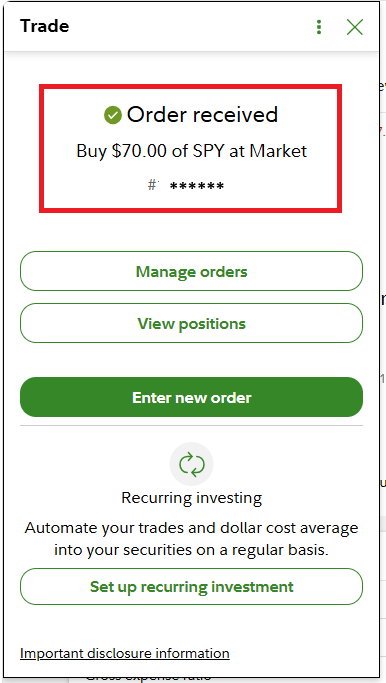
Order Confirmation — SPY
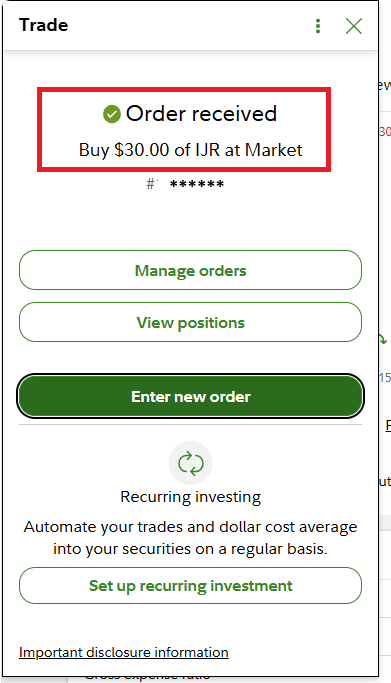
After clicking Place Order, you see the confirmation screen.
Step 4 — Placing the Remaining 3 Orders
Repeat the same process for IJR, SCHD, and QQQ. Each takes about 30 seconds. Four ETFs = four separate orders.
IJR — Wildcard Bucket ($30)
SCHD — Steady Income Bucket ($35)
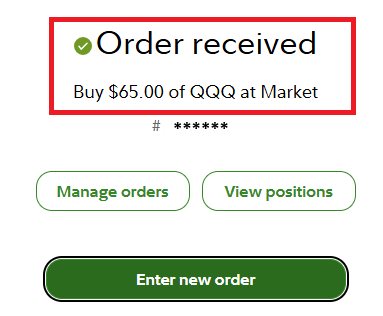
QQQ — Growth Engine Bucket ($65)
Fidelity offers two ways to place an order. Both are shown below:
Method A — From the Research & Quotes page (same panel approach as SPY):
Method B — Via Accounts & Trade → Trade (full-page form, easier to read):
Step 5 — What Your Account Looks Like Afterwards
Go to Positions tab to see your holdings. This is often the first place new investors get confused — here is how to read it.
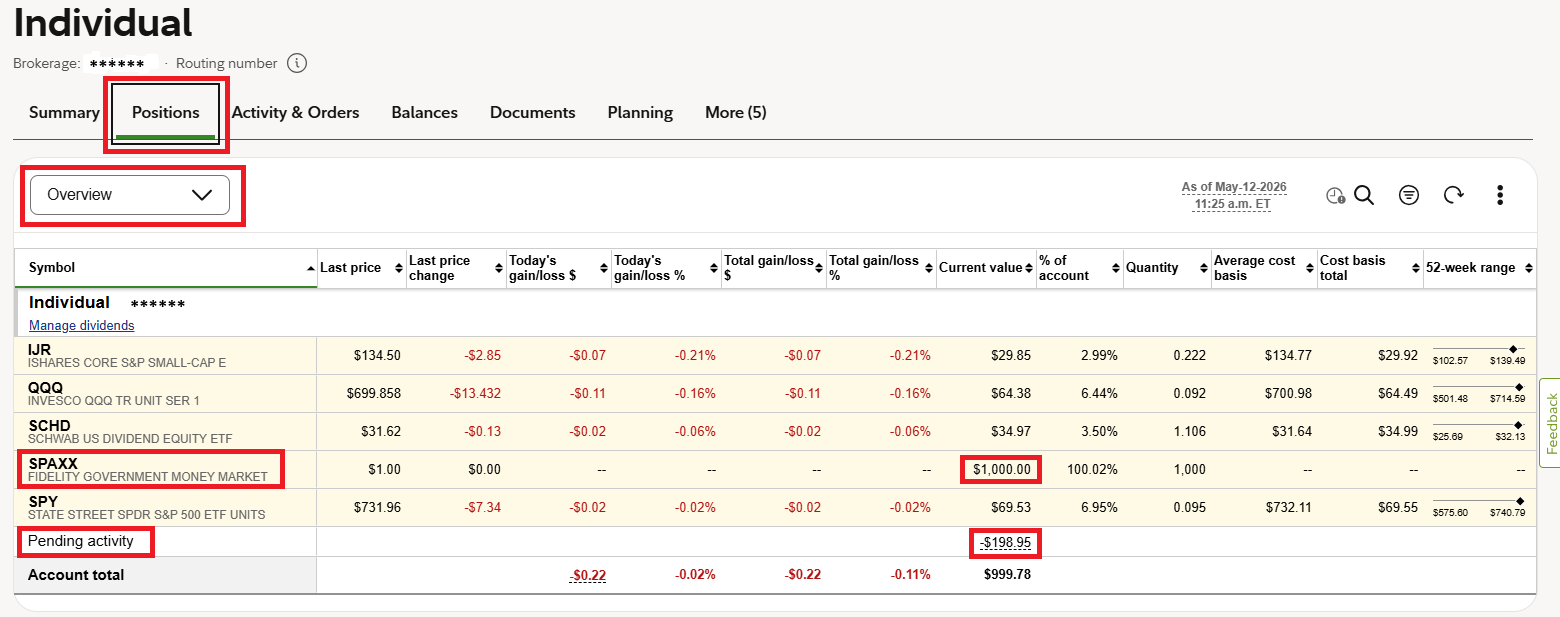
The "Current value" column changes every second as the market moves. SPY shows $69.53 even though you ordered $70 — the price dipped slightly after your order executed. This is completely normal. You own exactly what you paid for.
The $1,000 you deposited minus $198.95 invested = $801.05 remaining. Fidelity automatically parks uninvested cash into SPAXX (Fidelity Government Money Market Fund). It earns roughly 4–5% annual interest while sitting idle. It is not a stock — it's like a high-interest savings account inside your brokerage. The $1,000 shown is because the orders are still pending settlement.
This is the exact cash being deducted from your account — the sum of all four executed orders. This is the actual amount you spent, not the current market value of your holdings.
Step 6 — Finding Your Exact Executed Amounts
The Positions tab shows live market value — not what you paid. To find the exact amount each order executed for, go to Activity & Orders tab.
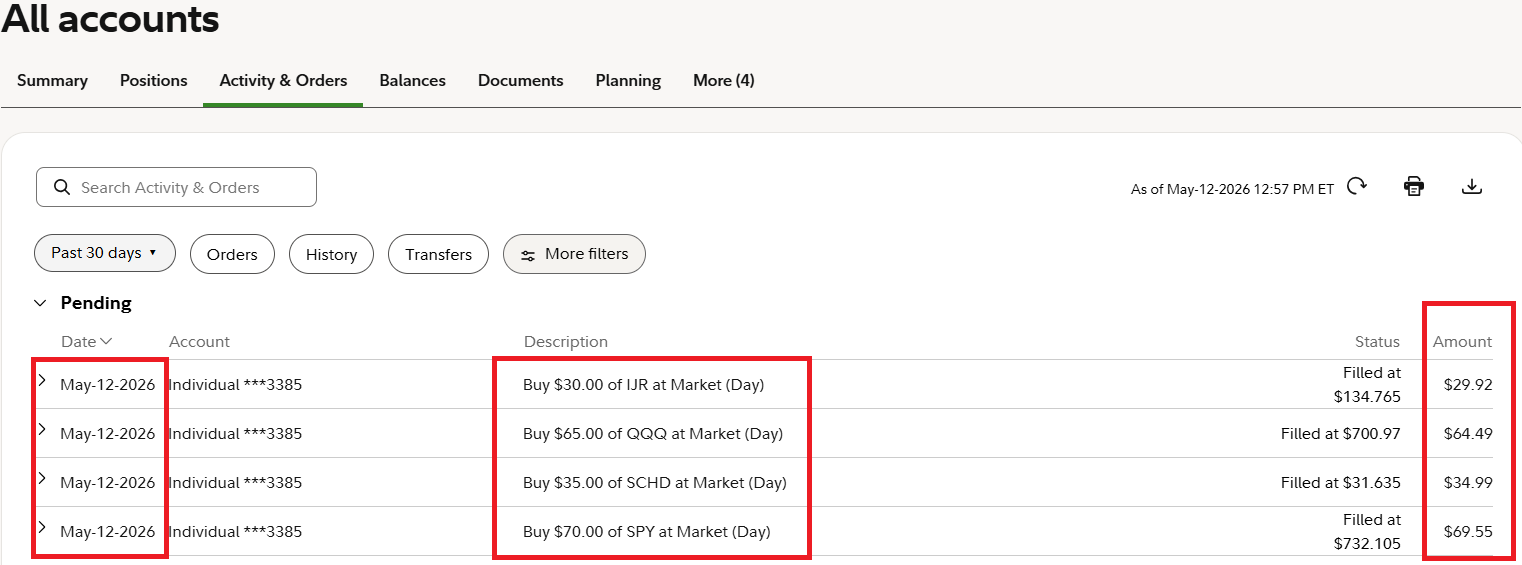
The executed amounts for this cycle:
| ETF | Bucket | Ordered | Filled At (per share) | Executed |
|---|---|---|---|---|
| SPY | Safety Anchor | $70.00 | $732.105 | $69.55 |
| QQQ | Growth Engine | $65.00 | $700.97 | $64.49 |
| SCHD | Steady Income | $35.00 | $31.635 | $34.99 |
| IJR | Wildcard | $30.00 | $134.765 | $29.92 |
| Total | $198.95 | |||
Step 7 — Recording Your Investment in PocketBull
After placing your orders in Fidelity, return to PocketBull and accept the cycle. This closes the loop and lets PocketBull track your portfolio history, streak, and performance over time.
Accepting the cycle
From the dashboard, click Log investments on your pending cycle. Enter the amounts PocketBull suggested (the planned amounts — you can update to actuals afterwards).
Editing actual executed amounts
In the Cycle History section, expand your cycle card and click ✏ Edit. Enter the exact amounts from Fidelity's Activity & Orders for each bucket, then Save.
What PocketBull does with this data
Every accepted cycle feeds your portfolio dashboard — cumulative invested, estimated current value (using live ETF prices), strategy comparison charts, and your investment streak. Over multiple cycles, the comparison chart shows whether PocketBull's AI allocation suggestions outperform a simple equal-split approach.
PocketBull vs Broker Auto-Invest
After your SPY order confirmed, your broker offered a "Set up recurring investment" option. Fidelity calls it Recurring Investment, Robinhood calls it Recurring Buys, Schwab calls it Automatic Investment Plan — all brokers offer some version. Here is why PocketBull is different — and when each approach makes sense.
| Feature | Traditional Brokers | PocketBull |
|---|---|---|
| Amount | Fixed — you set $200/month, always $200, no matter what the market does | Dynamic — AI adjusts based on current market conditions each cycle |
| Allocation split | Fixed — same 70/30 ratio forever — regardless of bull or bear market | Dynamic — ratios shift with market mood — more Safety when markets are bearish |
| ETF selection | You pick once, it repeats forever. No updates, no scoring | AI scores ETF candidates and picks the best entry each cycle |
| Market awareness | None — invests the same regardless of whether the market is up 3% or down 3% | Full — bearish days get more Safety weight; dips score higher as entry opportunities |
| Explanation | None — it just runs | Full AI analysis — why this amount, why this split, what the market is doing |
| Best for | Pure "set and forget" — no decisions ever | Informed discipline — consistent investing that adapts to conditions |
Glossary — Words Every New Investor Should Know
- ETF (Exchange-Traded Fund)
- A basket of stocks that trades like a single stock on an exchange. SPY holds all 500 companies in the S&P 500. Buying one share of SPY means you own a tiny piece of all 500 companies at once.
- Ticker Symbol
- The short code used to identify a stock or ETF on an exchange. SPY, QQQ, SCHD, IJR.
- Fractional Shares
- Buying a fraction of one share. Lets you invest exactly $70 in a $732 ETF. The broker calculates the precise fraction automatically.
- Market Order
- An instruction to buy immediately at the best available price. Used for liquid ETFs (those with millions of shares trading daily) where the price is fair and execution is instant.
- Fill Price
- The exact price per share at which your order actually executed. Shown in Activity & Orders. Slightly different from the price you saw when placing the order — because the market moves in milliseconds.
- Pending Activity
- Cash leaving your account for recent trades that haven't fully settled yet. Shows up as a negative number in Positions until settlement (usually T+1 for ETFs).
- SPAXX
- Fidelity Government Money Market Fund. Uninvested cash in your Fidelity account is automatically swept here. Earns approximately 4–5% annually. Not a stock — essentially a high-interest cash holding.
- SIP (Systematic Investment Plan)
- Investing a fixed (or AI-adjusted) amount on a regular schedule, regardless of short-term market movement. The core strategy behind PocketBull. Consistency and discipline beat trying to time the market.
- Cost Basis
- The price you paid for your shares. In the Positions page: "Average cost basis" column. Used to calculate your actual gain or loss when you eventually sell.
- 52-Week Range
- The lowest and highest price the ETF has traded in the past year. Gives context for whether today's price is near the top or bottom of its recent range. A price near the low end can indicate a buying opportunity.
- Brokerage Account
- The account where you hold and trade investments. Fidelity, Schwab, and Robinhood are examples. Your money is held by the broker, insured by SIPC up to $500,000.
- Dividend
- A portion of a company's profits paid out to shareholders periodically (quarterly for most US ETFs). SCHD is a dividend-focused ETF — part of its return comes from these regular payments, not just price growth.
Your First Investment — Quick Reference Checklist
Copy this for your next cycle.
- Run a PocketBull cycle and note the suggested amounts per bucket
- Log in to Fidelity → Accounts & Trade → Trade (or Research & Quotes)
- SPY → Buy → Dollars → enter Safety Anchor amount → Market → Preview → Place Order
- QQQ → Buy → Dollars → enter Growth Engine amount → Market → Preview → Place Order
- SCHD → Buy → Dollars → enter Steady Income amount → Market → Preview → Place Order
- IJR → Buy → Dollars → enter Wildcard amount → Market → Preview → Place Order
- Wait a few minutes → check Activity & Orders tab for filled amounts
- Return to PocketBull → accept cycle → log investments with planned amounts
- Click ✏ Edit on the cycle card → enter actual filled amounts from Fidelity → Save
- Check your portfolio page — cycle history updated, streak incremented 🐂